Compliance
SMS Consent Evidence
Last Updated: September 4, 2026
This public page documents how Fieldbook (USA Talent Solutions) collects consent for account-related SMS timesheet reminders. Opt-in occurs inside the authenticated app at app.fieldbook.io. Screenshots below show the exact Call-to-Action, including the unchecked checkbox and full disclosure text that reviewers cannot access without logging in.
Program summary
- Sender: Fieldbook / USA Talent Solutions
- Use case: Account-related weekly timesheet submission reminders only — no marketing or promotional SMS
- Frequency: Varies; typically up to 2 messages per week (e.g. Sunday reminder + Monday follow-up if not submitted)
- Rates: Message and data rates may apply
- Opt-out: Reply STOP, or turn reminders off in Fieldbook Settings
- Help: Reply HELP, or contact support@fieldbook.io
- Mobile data: We never share or sell your mobile number or messaging consent to third parties or affiliates for marketing.
Legal pages: Privacy Policy · Terms & Conditions
Employer creates the employee account
Employee enters their phone number and sees the SMS opt-in
Active consent via checkbox
Manage or turn off anytime in Settings
Screenshot — SMS opt-in (Worker Onboarding — Confirm your info)
Location: worker onboarding, “Confirm your info” step (behind login, shown right after the employer creates the account). The mobile phone number field and the SMS consent checkbox appear together in the same step. The checkbox is unchecked by default and consent is optional — the employee can leave it unchecked and continue.
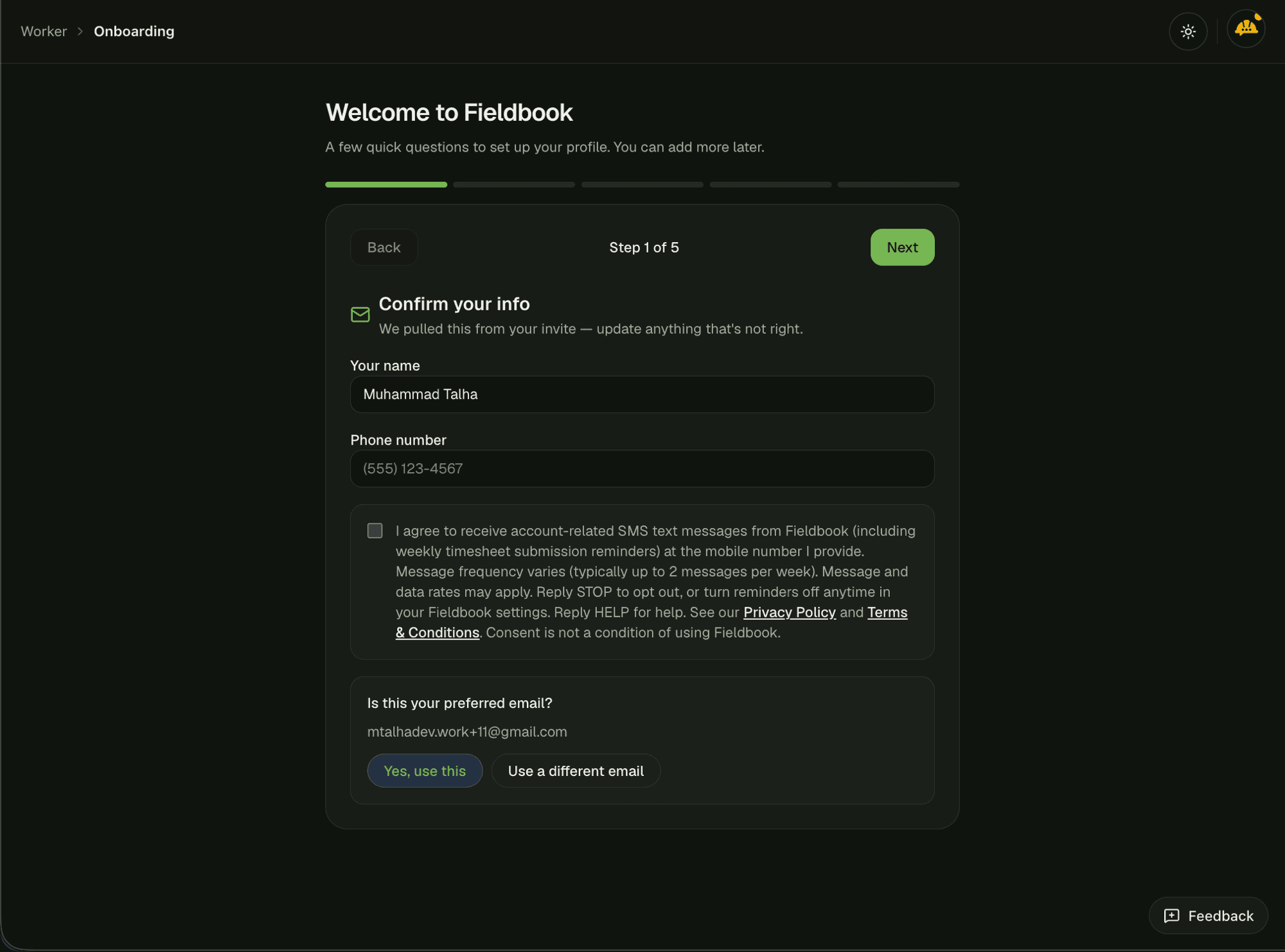
Exact disclosure text (verbatim from the app)
I agree to receive account-related SMS text messages from Fieldbook (including weekly timesheet submission reminders) at the mobile number I provide. Message frequency varies (typically up to 2 messages per week). Message and data rates may apply. Reply STOP to opt out, or turn reminders off anytime in your Fieldbook settings. Reply HELP for help.
The UI also links to Privacy Policy and Terms & Conditions and states: Consent is not a condition of using Fieldbook. Links: Privacy Policy · Terms & Conditions
Screenshot — Manage consent in Settings
Location: app.fieldbook.io/settings (behind login). Users can enable or disable “Weekly timesheet reminders” at any time. The same SMS disclosure appears under the toggle.
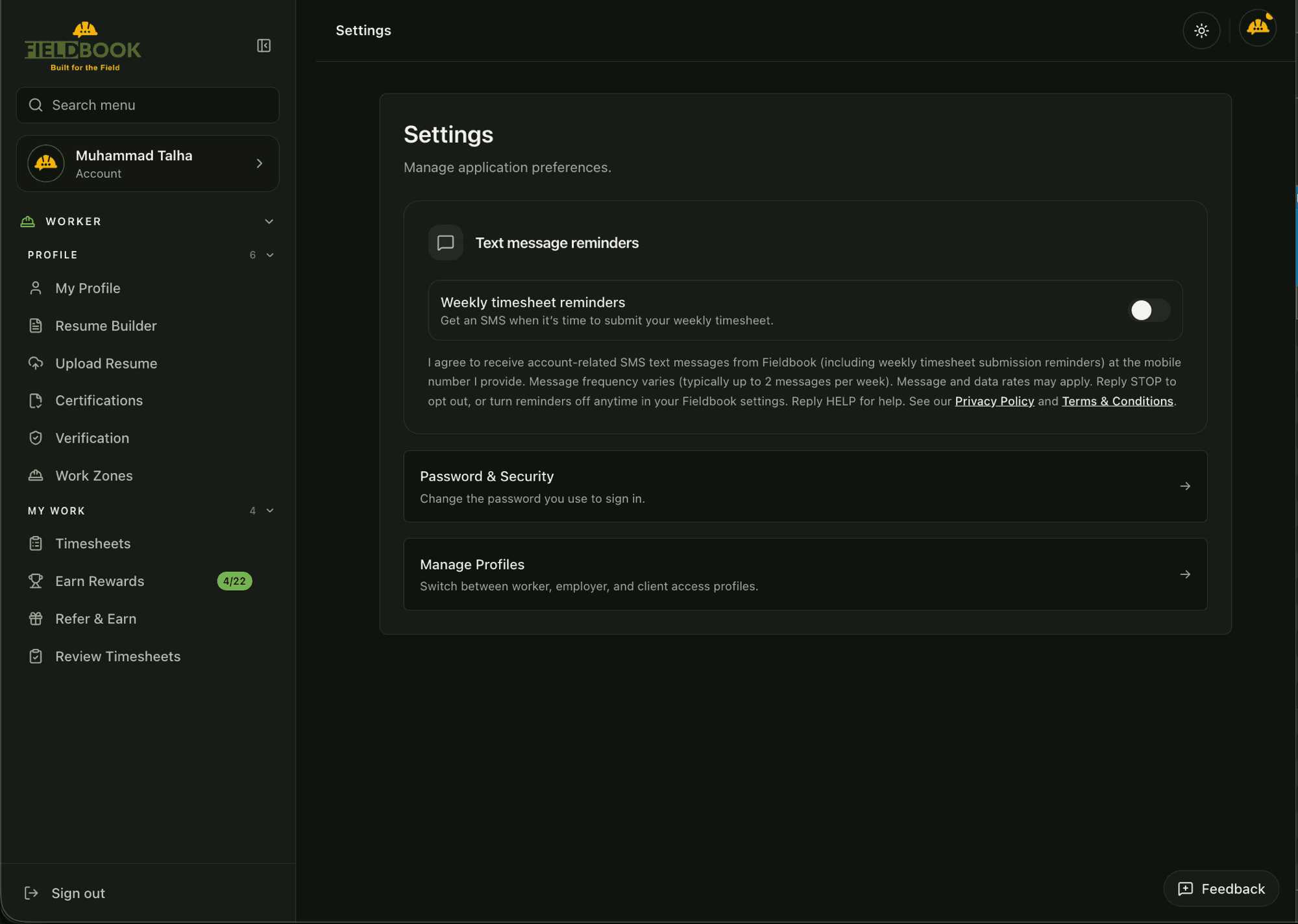
Exact disclosure text under the Settings toggle
I agree to receive account-related SMS text messages from Fieldbook (including weekly timesheet submission reminders) at the mobile number I provide. Message frequency varies (typically up to 2 messages per week). Message and data rates may apply. Reply STOP to opt out, or turn reminders off anytime in your Fieldbook settings. Reply HELP for help.
Example outbound SMS
Sample messages sent only to users who have opted in (must match Twilio campaign samples):
Fieldbook: Reminder — your weekly timesheet is due. Submit it in the app or at app.fieldbook.io. Reply STOP to opt out, HELP for help.
Fieldbook: Reminder — you haven't submitted your timesheet for this week. Please submit it in the app or at app.fieldbook.io. Reply STOP to opt out, HELP for help.
For A2P / Twilio reviewers
The live opt-in UI is behind authentication at app.fieldbook.io. This page hosts screenshots of that Call-to-Action and the verbatim disclosure text so consent can be verified without a login. Opt-in requires an unchecked-by-default checkbox and is not required to use the product.
- Privacy Policy: https://www.fieldbook.io/privacy-policy
- Terms & Conditions: https://www.fieldbook.io/terms-of-service
- This evidence page: https://www.fieldbook.io/sms-consent-evidence
- Support: support@fieldbook.io